الاسئلة الشائعة
All of ORVIBO devices work with HomeMate app.
Require Android 4.0 / iOS 8.0 and above
Please download HomeMate from Google Play Store or APP Store.
All of WiFi devices can't be controlled without internet. ZigBee devices can be controlled in LAN.
No limited.
No limited.
No limited.
Yes, It supports Chinese, English, Spanish, German, French, Japenese and Portuguese now.
HomeMate only supports China mainland mobile phone number at the moment..
Please check if you allow HomeMate to get the location permission on mobile phone.
1. Please check if you allow HomeMate to send the notification on mobile phone?
2. Go to the setting of HomeMate, enable the "Timing execution reminder".
3. Make sure you are in "Arming outside" or "Arming at home" mode.
1. Enter “Me” page, Click “Automation”.
2. Tap the “+” symbol on the up right corner.
3. Change your Automation name, then Click “Add start conditions”.
4. Choose the sensor you need such as “Window & Door Sensor opened”.
5. Click “Device” on the pop up window, choose the devices you need.
6. Tap “Continue to add” to add the other device.
7. Set the action time, status and save the Automation.
BLUE: ON
Flash BLUE: can't connect to the router
Flash RED quickly: Configuration mode
AC 120V 10A
MixPad D1 requires a neutral wire for installation and is compatible with American standard electrical boxes. It does not require any custom wiring, modifications or hubs.
MixPad D1 is compatible with 120V/60Hz electrical power.
No, MixPad D1 only controls lighting devices. It's not a substitute for switches that control non-lighting devices like fans, vents, outlets, smart bulbs, or floor heaters.
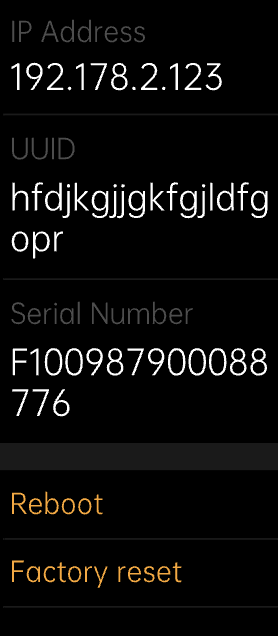
1. Go to "About", and tap "Reset" on the buttom to access the "Restore to factory settings with data deleted" interface. Press "confirm.
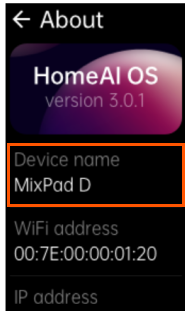
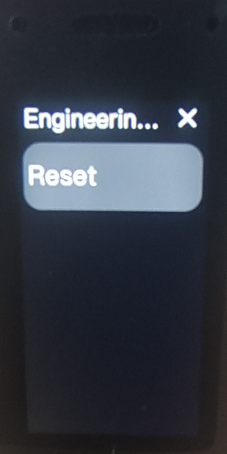
2. For the old version, go to "About", then long-press the "Device name/MixPad D1" section to access engineering mode, and tap "Reset" to access the "Restore to factory settings with data deleted" interface. Press "confirm".